Outputs
Besides the standard output, openLowdin can generate other type of outputs to view the results of an APMO calculation. Lowdin input has an “OUTPUTS” block to request these outputs. Currently, it can generate:
Molden files for each species.
AIM files. These files are generated with the molden2AIM program
Gaussian cubes for orbitals and density
Gnuplot 2D and 3D graphs for density and orbitals
Gaussian fchk files
If CI or NOCI calculations with “CIStatesToPrint” greater that zero were selected, the molden, cubes and gnuplot files will use the CI or NOCI natural orbitals and/or density. Adding “state=N” to a line inside the “OUTPUTS” block allow us to select the desired excited state.
Molden and AIM files
To generate molden or AIM files simply add in the OUTPUTS block:
moldenFile
wfnFile
wfxFile
NBO47File
openLowdin will generate an .molden, .wfn, .wfx, or .47 file for each quantum species in the input.
For molden, there are three format types that can be selected with the CONTROL option
QUANTUM |
Define the coordinates, GTO and MO for each quantum species individually. |
STANDARD |
Same that QUANTUM but including the coordinates of classical particles. (Default) |
MIXED |
Same that STANDARD but including 1s GTO for each classical particles with zero contribution in the MO. |
All three formats work with the MOLDEN software. Other visualization codes may require the MIXED or QUANTUM formats.
See Molden examples for full input examples to generate molden files
Gaussian Cubes
openLowdin generates Gaussian density or orbital cubes of a chosen species. These cubes can be read by many visualization programs, such as VMD. To generate cubes, add in the OUTPUTS block the lines
orbitalCube
densityCube
openLowdin will generate a .cub file for each cube requested.
Add in each line “species=symbol”, where symbol is the quantum species to be plotted. To generate a cube for each species, use “species=ALL”. For orbital plots, select an orbital with “orbital=N”. The default is the HOMO of each species.
The position of the center of the cube is declared with “center=X Y Z” or with “point1=X Y Z”. With “cubeSize=N” we declare the length of one side of the cube. The number of points is controled either by defining the number of points per side with “pointsPerDim=N”, or the separation between points in one dimension, with “scanStep=N”
See Cubes examples for full input examples to generate orbital and density cube files
Gnuplot 2D and 3D graphs
openLowdin generates plots of the density or orbitals of a chosen species using Gnuplot. To do this, add in the OUTPUTS block the lines
densityPlot
orbitalPlot
As with the orbital cubes “species=symbol” selects the desired quantum species to be plotted. species=ALL is supported. For orbital plots, choose an orbital with “orbital=N”, the default will be the HOMO of each species.
To create 2D plots, add dimensions=2, select and axis and provide TWO endpoints.
axis=”A” limitA=p1 p2, replace A with x, y, z
When using the axis directive, “offsetX=”, “offsetY=”, “offsetZ=” may be used to shift the plot.
A more general definition may be provided with
point1=X1 Y1 Z1 point2=X2 Y2 Z2, where X,Y,Z are coordinates of each endpoint
For example, to plot the electronic density from -2.0 to 2.0 along the Z axis add one of the following lines
densityPlot species=”e-” dimensions=2 axis=”z” limitZ=-2.0 2.0
densityPlot species=”e-” dimensions=2 point1= 0.0 0.0 -2.0 point2=0.0 0.0 2.0
To create 3D plots, set dimensions=3 and provide a plane with two endpoints for each axis
plane=”AB” limitA=p1 p2 limitB=p3 p4, replace A and B with x, y, z
an offset along the unused axis may be selected to shift the plot.
A more general definition is also possible, where the user provides THREE points corresponding to the corners of a rectangle.
point1=X1 Y1 Z1 point2=X2 Y2 Z2 point2=X3 Y3 Z3, where X,Y,Z are coordinates of each corner
For example, to plot electron density in the YZ plane, from -2.5 to 2.5 in both axis, use either of these lines
densityPlot species=”e-” dimensions=3 plane=yz limitY=-2.5 2.5 limitZ=-2.5 2.5
densityPlot species=”e-” dimensions=3 point1=0.0 2.5 2.5 point2=0.0 -2.5 2.5 point3=0.0 2.5 -2.5
In the general approach, the order of the corners is important. point1 must be the central coorner. See the following figure for an example
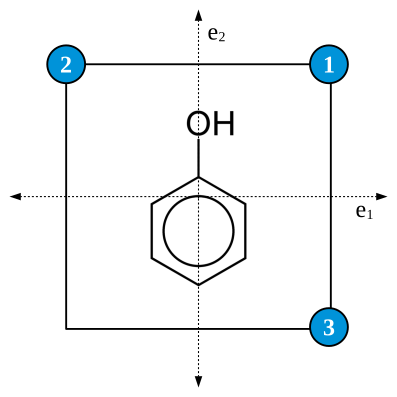
In both 2D and 3D plots, the number of points is controled either by defining the number of points per side with “pointsPerDim=N”, or the separation between points in one dimension, with “scanStep=N”
openLowdin will generate three files for Gnuplot: A .dens or a .orb with the raw data of the plot; a .gnp with the gnuplot script to generate the plot; and a .eps with the plot itself.
Fchk files
Gaussian fchk files may be used to pass the results to other programs. Currenty, openLowdin uses them to exchange information with Erkale for orbital localization. Add the line in the OUTPUTS
fchkFile
to generate a file for each quantum species in the input. See Molden examples for an input example that employs orbital localization.